spring boot in practice
Spring Boot实践
目录
- 建立项目结构
- application.properties
- logback配置
- ehcache配置
- Swagger2配置
- MessageResources配置
- 统一异常处理
- liquibase
- JPA data access
- FeignClient
- actuator
- jacoco
- javadoc
- plantuml
- 发布到私有maven仓库
- spring test & Mockito
建立项目结构
一切从spring-boot-starter-parent开始,建立一个maven的pom项目,项目名称:parent ,这个项目只包括一个pom.xml文件,用于管理整个项目的maven dependency。
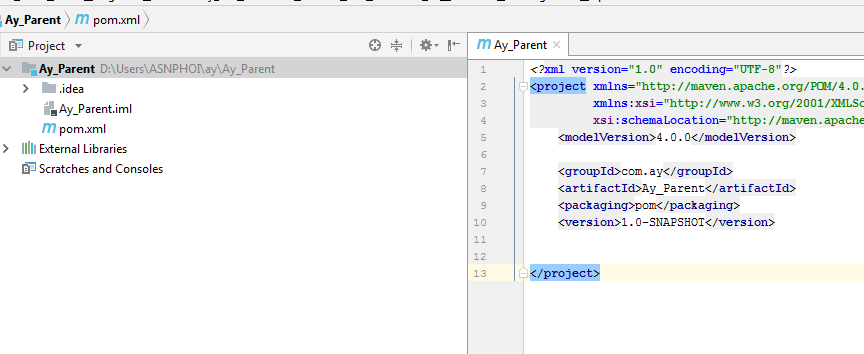
Parent项目
关于pom.xml的内容
- pom文件的
packaging类型必须是pom
...
<packaging>pom</packaging>
...
spring-boot-starter-parent,因为这是一个SpringBoot项目,所以项目必须继承spring-boot-starter-parent
<parent>
	<groupId>org.springframework.boot</groupId>
	<artifactId>spring-boot-starter-parent</artifactId>
	<version>2.0.1.RELEASE</version>
</parent>
- 在
dependencyManagement里加入spring-cloud-dependencies,在这个项目中,我们使用的FeignClient是依赖spring-clound-dependencies的
<properties>
...
<spring.cloud.version>Finchley.RELEASE</spring.cloud.version>
</properties>
...
<dependency>
	<groupId>org.springframework.cloud</groupId>
	<artifactId>spring-cloud-dependencies</artifactId>
	<version>${spring.cloud.version}</version>
    <type>pom</type>
	<scope>import</scope>
</dependency>
...
- 我们有使用流的方式读取excel,在
dependencyManagement中加入关于excel的dependency
...
<org.apache.poi.version>3.16</org.apache.poi.version>
<poi.streaming.version>1.2.0</poi.streaming.version>
...
<dependency>
	<groupId>org.apache.poi</groupId>
	<artifactId>poi</artifactId>
	<version>${org.apache.poi.version}</version>
</dependency>
<dependency>
	<groupId>org.apache.poi</groupId>
	<artifactId>poi-ooxml</artifactId>
	<version>${org.apache.poi.version}</version>
</dependency>

<dependency>
	<groupId>com.monitorjbl</groupId>
	<artifactId>xlsx-streamer</artifactId>
	<version>${poi.streaming.version}</version>
</dependency>
...
- 关于JPA使用的读取database的依赖,apache commons依赖,web appliation依赖加入到
dependencyManager
...
<jdbc.sqlserver.version>5.0</jdbc.sqlserver.version>
<jdbc.mysql.version>6.0.6</jdbc.mysql.version>
<commons.lang3.version>3.2.1</commons.lang3.version>
<commons.collections.version>3.2.1</commons.collections.version>
<servlet.api.version>2.5</servlet.api.version>
...
<dependency>
	<groupId>com.microsoft.sqlserver</groupId>
	<artifactId>sqljdbc4</artifactId>
	<version>${jdbc.sqlserver.version}</version>
</dependency>

<dependency>
	<groupId>mysql</groupId>
	<artifactId>mysql-connector-java</artifactId>
	<version>${jdbc.mysql.version}</version>
</dependency>

<dependency>
	<groupId>org.apache.commons</groupId>
	<artifactId>commons-lang3</artifactId>
	<version>${commons.lang3.version}</version>
</dependency>
<dependency>
	<groupId>commons-collections</groupId>
	<artifactId>commons-collections</artifactId>
	<version>${commons.collections.version}</version>
</dependency>
<dependency>
	<groupId>javax.servlet</groupId>
	<artifactId>servlet-api</artifactId>
	<version>${servlet.api.version}</version>
</dependency>

<dependency>
	<groupId>javax.servlet</groupId>
	<artifactId>javax.servlet-api</artifactId>
	<version>${servlet.api.version}</version>
</dependency>
- 在
dependencies里加入所有子项目都需要用到的依赖
项目用到spring-test , mockito , junit 来构建测试框架,加入以下相关依赖包
...
<mockito.version>1.10.19</mockito.version>
...
<dependency>
	<groupId>org.springframework.boot</groupId>
	<artifactId>spring-boot-starter-test</artifactId>
	<scope>test</scope>
</dependency>
<dependency>
	<groupId>org.springframework</groupId>
	<artifactId>spring-test</artifactId>
	<scope>test</scope>
</dependency>
<dependency>
	<groupId>org.mockito</groupId>
    <artifactId>mockito-all</artifactId>
    <version>${mockito.version}</version>
	<scope>test</scope>
</dependency>
<dependency>
	<groupId>junit</groupId>
	<artifactId>junit</artifactId>
	<scope>test</scope>
</dependency>
- 使用
sonarQue扫描代码缺陷,作为质量内建的工具之一,在dependenies里加入sonarQue的依赖
...
<sonar.maven.plugin.version>3.4.0.905</sonar.maven.plugin.version>
...
<dependency>
    <groupId>org.sonarsource.scanner.maven</groupId>
    <artifactId>sonar-maven-plugin</artifactId>
    <version>${sonar.maven.plugin.version}</version>
</dependency>
- 子项目作为jar包的方式提供组件服务,在
buildplugins加入maven-jar-plugin,同时在jar包打包时包括源代码,加入maven-source-plugin
<plugin>
	<groupId>org.apache.maven.plugins</groupId>
	<artifactId>maven-jar-plugin</artifactId>
</plugin>
<plugin>
	<groupId>org.apache.maven.plugins</groupId>
	<artifactId>maven-source-plugin</artifactId>
	<executions>
     	<execution>
				<id>attach-sources</id>
				<goals>
					<goal>jar</goal>
				</goals>
		</execution>
	</executions>
</plugin>
- 在
buildplugins加入maven-surefire-plugin,用来运行系统的test case,时同加入jacoco-maven-plugin,用来生成代码覆盖率统计数据
...
<surefireArgLine></surefireArgLine>
<maven.test.skip>false</maven.test.skip>
<skipTests>false</skipTests>
<skipITs>false</skipITs>
...
<plugin>
	<groupId>org.apache.maven.plugins</groupId>
	<artifactId>maven-surefire-plugin</artifactId>
	<version>2.18.1</version>
	<configuration>
			<failIfNoTests>false</failIfNoTests>
			<argLine>${surefireArgLine}</argLine>
			<includes>
				<include>**/*Test.java</include>
				<include>**/Test*.java</include>
			</includes>
			<excludes>
				<exclude>**/*IT.java</exclude>
				<exclude>**/IT*.java</exclude>
				<exclude>**/*ITCase.java</exclude>
			</excludes>
			<skip>${maven.test.skip}</skip>
			<skipTests>${skipTests}</skipTests>
	</configuration>
	<executions>
			<execution>
				<id>integration-tests</id>
				<goals>
					<goal>test</goal>
				</goals>
            	<configuration>
					<skip>${skipITs}</skip>
					<includes>
						<include>**/*IT.java</include>
						<include>**/IT*.java</include>
						<include>**/*ITCase.java</include>
					</includes>
					<excludes>
						<exclude>**/*Test.java</exclude>
						<exclude>**/Test*.java</exclude>
					</excludes>
				</configuration>
			</execution>
	</executions>
</plugin>
<plugin>
	<groupId>org.jacoco</groupId>
	<artifactId>jacoco-maven-plugin</artifactId>
	<version>0.8.1</version>
	<configuration>
		<destFile>${project.build.directory}/coverage-reports/jacoco-ut.exec</destFile>
		<dataFile>${project.build.directory}/coverage-reports/jacoco-ut.exec</dataFile>
		<skip>${skipTests}</skip>
		<output>file</output>
		<append>true</append>
	</configuration>
	<executions>
		<execution>
			<id>pre-unit-test</id>
			<goals>
				<goal>prepare-agent</goal>
			</goals>
            <phase>compile</phase>
			<configuration>
				<propertyName>surefireArgLine</propertyName>
		    </configuration>
		</execution>
			<execution>
				<id>post-unit-test</id>
				<phase>test</phase>
				<goals>
		        	<goal>report</goal>
				</goals>
				<configuration>
					<outputDirectory>${project.reporting.outputDirectory}/jacoco-ut</outputDirectory>
				</configuration>
			</execution>
		</executions>
</plugin>
surefireArgLine由jacoco-maven-plugin设置值,提供maven-surefire-plugin使用,使jacoco可以抓取test case执行时的统计数据
在pluginManagement plugins加入liquibase-maven-plugin用来管理database的持续开发与集成
...
<pluginManagement>
     <plugins>
          <plugin>
              <groupId>org.liquibase</groupId>
              <artifactId>liquibase-maven-plugin</artifactId>
          </plugin>
     </plugins>
....
</pluginManagement>
...
以上为parent项目的基本结构完成,但是一些其他应用的plugin还没有加入,比如maven-javadoc-plugin 等,我在用到这些插件再添加。
开始下一步之前,首先在parent项目里运行mvn install命令,下载相关依赖和插件。
ERP项目
新建 ERP项目 ,这是一个聚合项目ERP包括CRM子项目,项目结构如下:
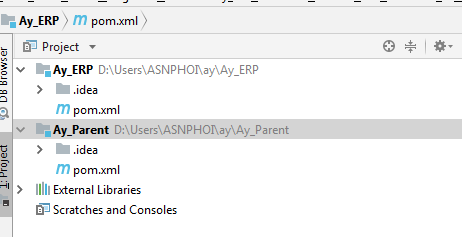
pom.xml文件内容
maven项目类型
<packaging>pom</packaging>
ERP继承Parent项目
<parent>
      <groupId>com.ay</groupId>
      <artifactId>Ay_Parent</artifactId>
      <version>1.0-SNAPSHOT</version>
</parent>
erp作为一个web application,为每个子项目引入spring-boot-starter-web,同时使用logback日志,引用logback-classic。
我们使用前后面后离的开发模式,后端应用引用swagger UI管理rest-API,引入swagger-annotations。
在dependencies加入以下依赖。
<dependency>
	<groupId>ch.qos.logback</groupId>
	<artifactId>logback-classic</artifactId>
</dependency>
<dependency>
	<groupId>org.springframework.boot</groupId>
	<artifactId>spring-boot-starter-web</artifactId>
</dependency>
<dependency>
	<groupId>io.swagger</groupId>
	<artifactId>swagger-annotations</artifactId>
	<version>1.5.3</version>
</dependency>
- 默认情况下,引入
spring-boot-starter-web后,Spring Boot还会为我们引入以下几个包org.springframework.boot:spring-boot-starter
- –org.springframework.boot:spring-boot
- –org.springframework.boot:spring-boot-autoconfigure
- –org.springframework.boot:spring-boot-starter-logging
- –org.springframework.boot:spring-core
- –org.yaml:snakeyaml
新建ERP子模块
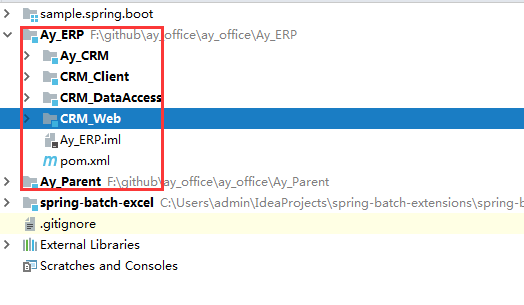
按功能职责分成以下几个模块
Ay_CRM核心CRM业务逻辑,通过restfull-API对外提供服务ERP_Client提供FeignClient接口ERP_DataAccess提供持久层服务ERP_Web负责打包运行web application服务
ERP_DataAccess模块
负责ERP项目的持久层服务,DataAccess使用 Spring JAP抽象关系统数据库的访问。首先作为Spring Boot项目,先引入依赖:spring-boot-starter,同时因为maven的传递依赖,同时也会引入Spring Boot的几个核心包:spring-boot,spring-boot-autoconfugure,spring-boot-starter-loggin,spring-core,snakeyaml
...
 <dependency>
     <groupId>org.springframework.boot</groupId>
     <artifactId>spring-boot-starter</artifactId>
 </dependency>
...
引入spring-boot-starter-data-jpa包与sqljdbc4包,基于sql server关系数据库开发
<dependency>
    <groupId>org.springframework.boot</groupId>
    <artifactId>spring-boot-starter-data-jpa</artifactId>
</dependency>
<dependency>
    <groupId>com.microsoft.sqlserver</groupId>
    <artifactId>sqljdbc4</artifactId>
</dependency>
database unit test使用liquibase与h2内存数据库,引入相关的包
 <dependency>
      <groupId>org.liquibase</groupId>
      <artifactId>liquibase-core</artifactId>
      <scope>test</scope>
 </dependency>
 <dependency>
      <groupId>com.h2database</groupId>
      <artifactId>h2</artifactId>
      <scope>test</scope>
 </dependency>
因为只在test阶段使用,所以liuqibase-core, h2的scope是test
引入liquibase-maven-plugin插件,管理database的持续集成与开发
 <properties>
        <liquibase.action>updateSQL</liquibase.action>
    </properties>
    <profiles>
        <profile>
            <id>updateSQL</id>
            <properties>
                <liquibase.action>updateSQL</liquibase.action>
            </properties>
        </profile>
        <profile>
            <id>update</id>
            <properties>
                <liquibase.action>update</liquibase.action>
            </properties>
        </profile>
    </profiles>
    <build>
        <plugins>
            <plugin>
                <groupId>org.liquibase</groupId>
                <artifactId>liquibase-maven-plugin</artifactId>
                <configuration>
                    <propertyFileWillOverride>true</propertyFileWillOverride>
                    <propertyFile>src/main/resources/liquibase.properties</propertyFile>
                    <promptOnNonLocalDatabase>false</promptOnNonLocalDatabase>
                </configuration>
                <executions>
                    <execution>
                        <phase>process-resources</phase>
                        <goals>
                            <goal>${liquibase.action}</goal>
                        </goals>
                    </execution>
                </executions>
            </plugin>
        </plugins>
    </build>
运行mvn package -P update就可以将liuqibase的change set执行并应用到db;mvn package -P updateSQL就可以对比change set与db之间的差异并生成sql 脚本,以便检查并手动执行chnage set。
通过以上的配置,我们就可以使用liquibase管理和续持集成开发database。但在实际开过程中,我们会发现:当我们在java persistence object里定义了db的结构,再把这种定义用xml的形式翻译成liquibase的changelog,liquibase再把changelog应用到db。在java persistence object,xml,db之间,用三种不同的形式描述相同的db结构。我们期望只维护一种表达形式(java),其他两种表达形式可以由工具帮我们自动维护,xml与db之间由liquibase自动帮我们管理,但是java与xml之间到目前为止,还没有自动管理手段。liquibase提供了一个插件帮我们从java persistence object生成changelog:liquibase-hibernate5,我们修改liquibase-maven-plugin配置加入相关依赖,如下:
....
			<liquibase-hibernate5.version>3.6</liquibase-hibernate5.version>
        	<spring.jpa.version>2.0.6.RELEASE</spring.jpa.version>
			<plugin>
                <groupId>org.liquibase</groupId>
                <artifactId>liquibase-maven-plugin</artifactId>
                <configuration>
                    <propertyFileWillOverride>true</propertyFileWillOverride>
                    <propertyFile>src/main/resources/liquibase.properties</propertyFile>
                    <promptOnNonLocalDatabase>false</promptOnNonLocalDatabase>
                </configuration>
                <executions>
                    <execution>
                        <phase>process-resources</phase>
                        <goals>
                            <goal>${liquibase.action}</goal>
                        </goals>
                    </execution>
                </executions>
                <dependencies>
                    <dependency>
                        <groupId>org.liquibase.ext</groupId>
                        <artifactId>liquibase-hibernate5</artifactId>
                        <version>${liquibase-hibernate5.version}</version>
                    </dependency>
                    <dependency>
                        <groupId>org.springframework</groupId>
                        <artifactId>spring-beans</artifactId>
                        <version>${spring.version}</version>
                    </dependency>
                    <dependency>
                        <groupId>org.springframework.data</groupId>
                        <artifactId>spring-data-jpa</artifactId>
                        <version>${spring.jpa.version}</version>
                    </dependency>
                    <dependency>
                        <groupId>org.springframework</groupId>
                        <artifactId>spring-core</artifactId>
                        <version>${spring.version}</version>
                    </dependency>
                    <dependency>
                        <groupId>org.springframework</groupId>
                        <artifactId>spring-context</artifactId>
                        <version>${spring.version}</version>
                    </dependency>
                </dependencies>
            </plugin>
在liquibase.properties配置文件加入配置:
referenceUrl: hibernate:spring:com.ay.erp.dao.persistence?dialect=org.hibernate.dialect.SQLServerDialect
diffChangeLogFile: src/main/resources/liquibase-diff-changeLog.xml
运行maven命令mvn liquibase:diff,即可以liquibase-diff-changeLog.xml文件中生成关于spring:com.ay.erp.dao.persistence包下的java persistence object与db之间的差异了,最后打开文件liquibase-diff-changeLog.xml作出必要的修改,整合成我们需要的changelog格式。
java persistence object的格式大概如下:
@Entity()
@Table(name = "ayErpCustomer"
,indexes = {
        @Index(name = "pk_ayErpCustomer_id",columnList = "id asc",unique = true),
        @Index(name = "index_ayErpCustomer_id_name_birthday",columnList = "id desc,name desc,birthday desc",unique = false)
}
,uniqueConstraints = {
        @UniqueConstraint(columnNames = {"id"},name ="constraint_ayErpCustomer_id")
}
)
@Setter
@Getter
public class ErpCustomerPo extends BasePo {

    @TableGenerator(name = "ayErpCustomerGenerator", table = TABLE_NAME, pkColumnName = PK_COLUMN_NAME, valueColumnName = VALUE_COLUMN_NAME, initialValue = 0, allocationSize = 100)
    @GeneratedValue(generator = "ayErpCustomerGenerator",strategy = GenerationType.TABLE)
    @Id
    @Column(name = "id",columnDefinition = DaoConstant.BIGINT,nullable = false)
    private Long id;

    @Column(name = "name", columnDefinition = DaoConstant.VARCHAR, length = 100, nullable = false)
    private String name;

    @Column(name = "sex",columnDefinition = DaoConstant.CHAR,length = 1,nullable = false)
    private String sex;

    @Column(name = "birthday",columnDefinition = TIMESTAMP,nullable = true)
    private Date birthday;

    @Column(name = "personalPhone",columnDefinition = VARCHAR,nullable = true,length = 20)
    private String personalPhone;

    @Column(name = "busniessPhone",columnDefinition = VARCHAR,nullable = true,length = 20)
    private String busniessPhone;

    @Column(name = "officeAddress",columnDefinition = VARCHAR,nullable = true,length = 150)
    private String officeAddress;

    @Column(name = "homeAddress",columnDefinition = VARCHAR,nullable = true,length = 150)
    private String homeAddress;
}
- DB unit test
DB unit test是基于Spring Boot使用liquibase 和h2内存数据库构建不依赖外部的测试环境,首先在test->java包下建Spring Boot的启动类仅用于DB unit test
@SpringBootApplication
@ComponentScan(basePackages = "com.ay.erp.dao",useDefaultFilters = false,
        includeFilters = {@ComponentScan.Filter(type = FilterType.ANNOTATION, classes = Repository.class)
        })
@EntityScan(basePackages = "com.ay.erp.dao")
public class DbUnitConfig {
}
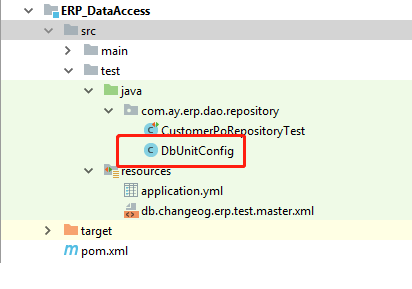
DB unit test需要依赖DbUnitConfig的配置启动
添加Spring Boot和liquibase的启动配置文件test/java/resources/application.yml,如上图所示,内容如下,
logging:
  level:
    org.springframework: DEBUG
    com.ay: DEBUG
    liquibase: DEBUG
    org.h2: DEBUG

spring:
  liquibase:
    change-log: classpath:db.changeog.erp.test.master.xml
    contexts: UT
    enabled: true
    drop-first: false
  jpa:
    generate-ddl: false
    show-sql: true
    hibernate:
      naming:
#      This is needed, otherwise hibernate will change the table name in SQL. Such as: change TblAddress to tbl_address
        physical-strategy: org.hibernate.boot.model.naming.PhysicalNamingStrategyStandardImpl
建立liquibase changelog配置文件db.changeog.erp.test.master.xml,这个文件直接引用main/resources/db.changelog.erp.master.xml文件,使已经配置好的changelog文件集合
<?xml version="1.0" encoding="UTF-8"?>
<databaseChangeLog
        xmlns="http://www.liquibase.org/xml/ns/dbchangelog"
        xmlns:xsi="http://www.w3.org/2001/XMLSchema-instance"
        xsi:schemaLocation="http://www.liquibase.org/xml/ns/dbchangelog
         http://www.liquibase.org/xml/ns/dbchangelog/dbchangelog-3.1.xsd">
    <include file="db.changelog.erp.master.xml"></include>
</databaseChangeLog>
配置完成,开始第一个test case
@RunWith(SpringRunner.class)
@DataJpaTest
@Transactional
public class CustomerPoRepositoryTest {

    @Autowired
    CustomerPoRepository repository;

    @Test
    public void should_save_and_find_success() {
        //given
        ErpCustomerPo po = createPersistenceObject();

        //when
        repository.save(po);
        Optional<ErpCustomerPo> result = repository.findById(po.getId());
        //then
        Assertions.assertThat(repository.count()).isEqualTo(1);
        Assertions.assertThat(result.get().getId()).isEqualTo(po.getId());
    }

    @Test
    public void should_delete_success() {
        //given
        ErpCustomerPo po = createPersistenceObject();
        repository.save(po);
        //when
        repository.delete(po);
        //then
        Assertions.assertThat(repository.count()).isEqualTo(0);
    }

    private ErpCustomerPo createPersistenceObject() {
        ErpCustomerPo po = new ErpCustomerPo();
        po.setBirthday(new Date());
        po.setBusniessPhone("123");
        po.setHomeAddress("11");
        po.setName("AndyLi");
        po.setOfficeAddress("chinase");
        po.setSex("M");
        po.setRecordStatus("A");
        return po;
    }
}
ERP_Web模块
Web模块负责配置打包运行ERP应用
- application.propertes配置文件
在maven的resources目录下新建application.properties配置文件。
关于application.properties的详细配置项信息,请点这里查看

完成Spring Boot配置文件后,新建Spring Boot启动类@SpringBootApplication
@SpringBootApplication(scanBasePackages = "com.ay")
@EnableCaching
@EnableTransactionManagement
@Slf4j
public class ErpApp {
    public static void main( String[] args ){
        SpringApplication.run(ErpApp.class, args);
    }
    /**
     *  create a CommandLineRunner to initiate application during application context starting
     * @param context spring application context
     * @return CommandLineRunner using to take action of initiation
     */
    @Bean
    public CommandLineRunner commandLineRunner(ApplicationContext context) {
        return args -> {
            log.info("inspect the beans provided by Spring Boot:");

            String[] beanNames = context.getBeanDefinitionNames();
            Arrays.sort(beanNames);
            for (String beanName : beanNames) {
                log.info(beanName);
            }

        };
    }
}
使用SwaggerUI管理restful API
加Swagger相关依赖包
...
		<dependency>
            <groupId>io.springfox</groupId>
            <artifactId>springfox-swagger2</artifactId>
            <version>2.6.1</version>
        </dependency>
        <dependency>
            <groupId>io.springfox</groupId>
            <artifactId>springfox-swagger-ui</artifactId>
            <version>2.6.1</version>
        </dependency>

        <dependency>
            <groupId>com.google.guava</groupId>
            <artifactId>guava</artifactId>
            <version>23.6-jre</version>
        </dependency>
...
新增Swagger关于Spring Boot的配置
@Configuration
@EnableSwagger2
public class SwaggerConfig {

	@Bean
	public Docket createDocket() {
		return new Docket(DocumentationType.SWAGGER_2)
				.apiInfo(createApiInfo())
				.select()
				//select()method return back  ApiSelectorBuilder instance to control which API should be shown using Swagger , in this configuration we will scan the the class underlyying specifical package
				//,Swagger will scan all the controller under package:com.aiatss.coast to create document except for method annotated @ApiIgnore
				.apis(RequestHandlerSelectors.basePackage("com.ay"))
				.paths(PathSelectors.any())
				.build();
	}

	private ApiInfo createApiInfo() {
		return  new ApiInfoBuilder()
				.title("restful API")
				//.description("")
				.termsOfServiceUrl("http://google.com")
				//.contact("COAST NFR")
				.version("0.0.1-SNAPSHOT")
				.build();
	}
}
通过Spring Boot的启动类启动ErpApp,并在浏览器输入地址:http://localhost:8080/swagger-ui.html 即可访问swagger ui主界面
Ay_Aggregate 项目
Ay_Aggreate项目的作用与Ay_Parent类似,是<packaging>pom</packaging>类型项目,不负责具体的功能代码。主要作为项目的聚合根,聚合所有的项目模块,负责一些跟聚合相关的操作和配置。
例如下面要介绍的关于生成所有项目的测试覆盖率报告。我们通过jacoco-maven-plugin生成所有项目的测试报告,但是最早期时jacoco-maven-plugin只能在单个项目的target目录下生成单个项目的测试报告,但是随着复杂的多模块项目的出现,为了方面管理,我们需要把所有模块或者子项目的测试覆盖数据都聚合在同一份报告里生成,所以jacoc-maven-plugin插件又新增了一个gola:report-aggregate 用来把所有子项目(子模块)测试数据聚合在同一份报告里。jacoco-maven-plugin插件使用的测试数据是依赖插件:maven-surefire-plugin生成的,所以report-aggregate需要依赖每个单独项目下,由jacoco-maven-plugin集成maven-surefire-plugin生成的测试数据文件:jacoco.exec。所以关于这个数据文件的路径和名称的配置,如果不太清楚的话,就使用默认配置,如果report-aggregate没有找到对应的exec文件,生成的测试数据都错误的。
关于
jacoco-maven-plugin中report-aggregate的官方文档,请查看这里 «««< HEAD
=======
2e99269f3aae6146008d0ee647086a49918676a9
关于
report-aggregate在多模块项目中的演化过程,请看这里
Ay_Aggregate项目结构如下:
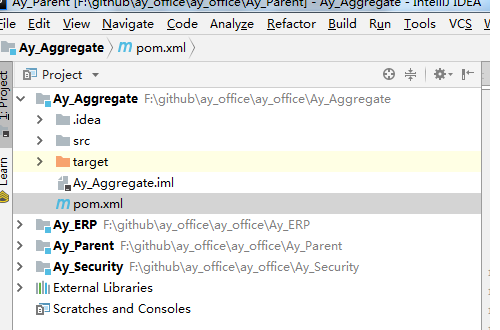
Ay_Aggreate通过继承Ay_Parent获得Ay_Parent的所有特性,同时把所有项目配置为Ay_Aggregate的子模块
<?xml version="1.0" encoding="UTF-8"?>
<project xmlns="http://maven.apache.org/POM/4.0.0"
         xmlns:xsi="http://www.w3.org/2001/XMLSchema-instance"
         xsi:schemaLocation="http://maven.apache.org/POM/4.0.0 http://maven.apache.org/xsd/maven-4.0.0.xsd">
    <modelVersion>4.0.0</modelVersion>

    <groupId>com.ay</groupId>
    <artifactId>Ay_Aggregate</artifactId>
    <packaging>pom</packaging>

    <parent>
        <groupId>com.ay</groupId>
        <artifactId>Ay_Parent</artifactId>
        <version>1.0-SNAPSHOT</version>
    </parent>

    <dependencies>
        <dependency>
            <groupId>com.ay</groupId>
            <artifactId>Ay_CRM</artifactId>
            <version>1.0-SNAPSHOT</version>
        </dependency>
        <dependency>
            <groupId>com.ay</groupId>
            <artifactId>ERP_DataAccess</artifactId>
            <version>1.0-SNAPSHOT</version>
        </dependency>
        <dependency>
            <groupId>com.ay</groupId>
            <artifactId>ERP_Client</artifactId>
            <version>1.0-SNAPSHOT</version>
        </dependency>
    </dependencies>

    <modules>
        <module>../Ay_ERP</module>
        <module>../Ay_Security</module>
    </modules>

    <build>
        <plugins>
            <plugin>
                <groupId>org.jacoco</groupId>
                <artifactId>jacoco-maven-plugin</artifactId>
                <executions>
                    <execution>
                        <id>report-aggregate</id>
                        <phase>verify</phase>
                        <goals>
                            <goal>report-aggregate</goal>
                        </goals>
                    </execution>
                </executions>
            </plugin>
        </plugins>
    </build>

</project>
在上面的代码中,需要注意的是:
packaging类型为pom- 通过以下配置继承
Ay_Parent项目
<parent>
    <groupId>com.ay</groupId>
    <artifactId>Ay_Parent</artifactId>
    <version>1.0-SNAPSHOT</version>
</parent>
- 配置测试覆盖率报告生成插件,
<plugin>
      <groupId>org.jacoco</groupId>
      <artifactId>jacoco-maven-plugin</artifactId>
      <executions>
            <execution>
                  <id>report-aggregate</id>
                  <phase>verify</phase>
                   <goals>
                       <goal>report-aggregate</goal>
                   </goals>
            </execution>
       </executions>
</plugin>
- 只配置了
jacoco-maven-plugin,暂时是不能生效生成覆盖率报告,还需要添加以下配置- 添加项目到将要生成的覆盖率报告中
<dependencies>
        <dependency>
            <groupId>com.ay</groupId>
            <artifactId>Ay_CRM</artifactId>
            <version>1.0-SNAPSHOT</version>
        </dependency>
        <dependency>
            <groupId>com.ay</groupId>
            <artifactId>ERP_DataAccess</artifactId>
            <version>1.0-SNAPSHOT</version>
        </dependency>
        <dependency>
            <groupId>com.ay</groupId>
            <artifactId>ERP_Client</artifactId>
            <version>1.0-SNAPSHOT</version>
        </dependency>
    </dependencies>
- 把需要生成覆盖率的项目作为子模块引入
  <modules>
        <module>../Ay_ERP</module>
        <module>../Ay_Security</module>
    </modules>
- 上面提到
report-aggregate需要集成maven-surefire-plugin来给每个单独子模块(子项目)生成测试数据:jacoco.exec。所在,在Ay_Parent配置好maven-surefire-plugin和jacoco-maven-plugin确保每个单独的项目可以正确生成测试数据文件
 <plugin>
                <groupId>org.apache.maven.plugins</groupId>
                <artifactId>maven-surefire-plugin</artifactId>
                <version>2.18.1</version>
                <configuration>
                    <failIfNoTests>false</failIfNoTests>
                    <argLine>@{surefireArgLine}</argLine>
                    <skip>${maven.test.skip}</skip>
                    <skipTests>${skipTests}</skipTests>
                </configuration>
                <executions>
                    <execution>
                        <id>unit-tests</id>
                        <phase>test</phase>
                        <goals>
                            <goal>test</goal>
                        </goals>

                    </execution>
                </executions>
            </plugin>
            <plugin>
                <groupId>org.jacoco</groupId>
                <artifactId>jacoco-maven-plugin</artifactId>
                <version>0.8.1</version>
                <configuration>
                    <skip>${skipTests}</skip>
                    <output>file</output>
                    <append>true</append>
                </configuration>
                <executions>
                    <execution>
                        <id>pre-unit-test</id>
                        <phase>initialize</phase>
                        <goals>
                            <goal>prepare-agent</goal>
                        </goals>
                        <configuration>
                            <propertyName>surefireArgLine</propertyName>
                        </configuration>
                    </execution>
                    <execution>
                        <id>post-unit-test</id>
                        <phase>test</phase>
                        <goals>
                            <goal>report</goal>
                        </goals>
                        <configuration>
                            <outputDirectory>${project.reporting.outputDirectory}/jacoco-ut</outputDirectory>
                        </configuration>
                    </execution>
                </executions>
            </plugin>
- 生成的测试覆盖率大概如下:
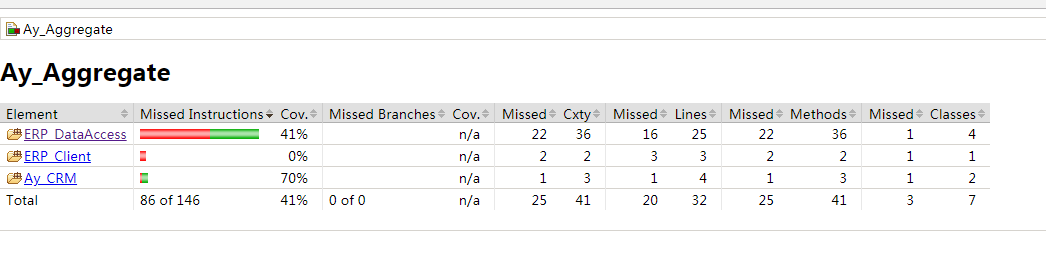
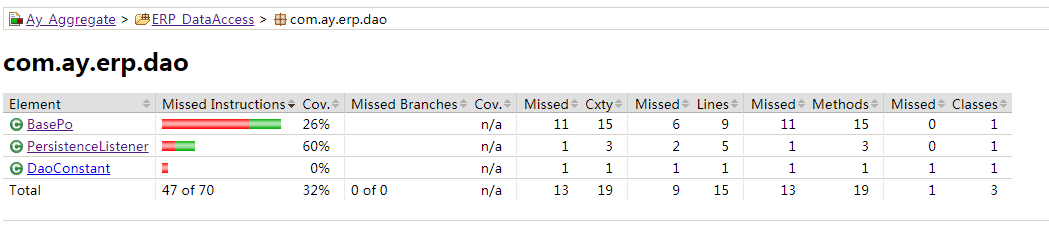
如果希望在生成的aggregate report里排除不需要测试的包或java,比如DTO包/bean包等java bean类,把
jacoco-maven-plugin配置调整如下,加入excludes元素,用来拓除指定的类或者包
 <plugin>
                <groupId>org.jacoco</groupId>
                <artifactId>jacoco-maven-plugin</artifactId>
                <executions>
                    <execution>
                        <id>report-aggregate</id>
                        <phase>verify</phase>
                        <configuration>
                            <excludes>
                                <exclude>com/**/*</exclude>
                            </excludes>
                        </configuration>
                        <goals>
                            <goal>report-aggregate</goal>
                        </goals>
                    </execution>
                </executions>
            </plugin>